Architecture
Dewy provides two distinct deployment modes for different use cases:
- Supervisor Mode (
server/assetscommands): Dewy acts as a process supervisor, managing applications as child processes with graceful restart capabilities. - Proxy Mode (
containercommand): Dewy runs a built-in TCP reverse proxy and manages Docker/Podman containers with rolling update deployments.
Interfaces
Dewy is composed of four interfaces as pluggable abstractions: Registry, Artifact, Cache, and Notifier.
- Registry: Version management (GitHub Releases, S3, GCS, OCI Registry, gRPC)
- Artifact: Binary/Image acquisition (corresponding Registry formats)
- Cache: Downloaded file management (File, S3, GCS)
- Notifier: Deployment notifications (Slack, Mail)
Deployment Process
The following diagram illustrates Dewy's deployment process and configuration.
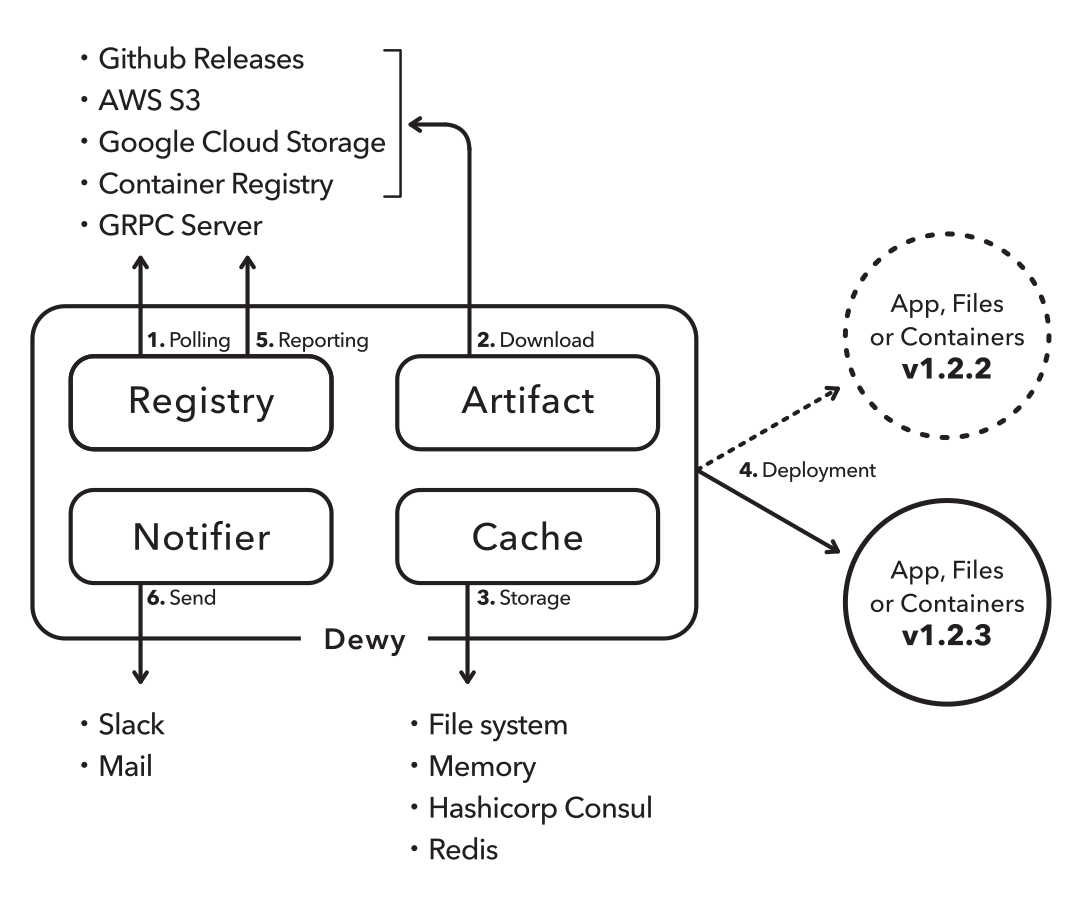
- Registry polls the specified registry to detect the latest version of the application
- Artifact downloads and extracts artifacts from the specified artifact store
- Cache stores the latest version and artifacts
- Dewy creates child processes for new version applications and begins processing requests with the new application
- Registry saves information about when, where, and what was deployed as files
- Notifier sends notifications to specified notification destinations
Supervisor Mode (server / assets)
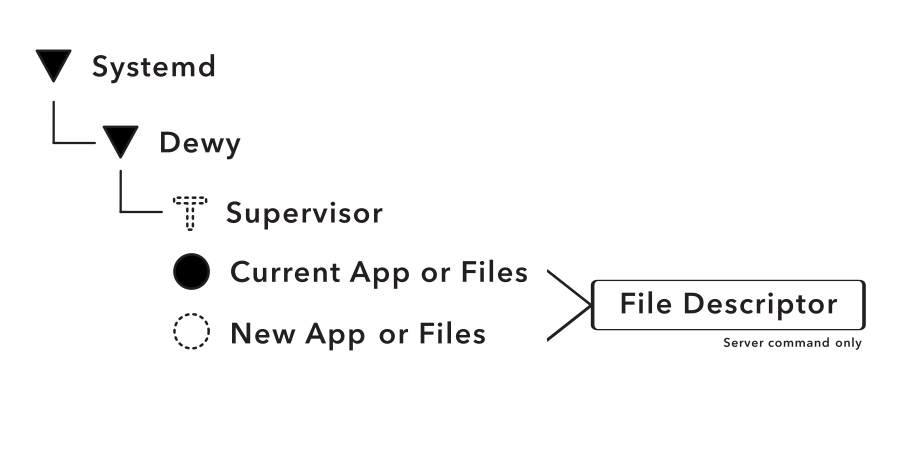
In Supervisor Mode, Dewy acts as the main process and launches applications as child processes. This mode is ideal for deploying binary applications directly on VMs or bare-metal servers.
Graceful Restart
For the server command, Dewy uses server-starter to achieve graceful restarts. When a new version is detected:
- Dewy sends SIGHUP to trigger a graceful restart
- The new application process starts and inherits the listening socket
- The old process finishes handling existing requests and exits
- Zero-downtime deployment is achieved
Proxy Mode (container)
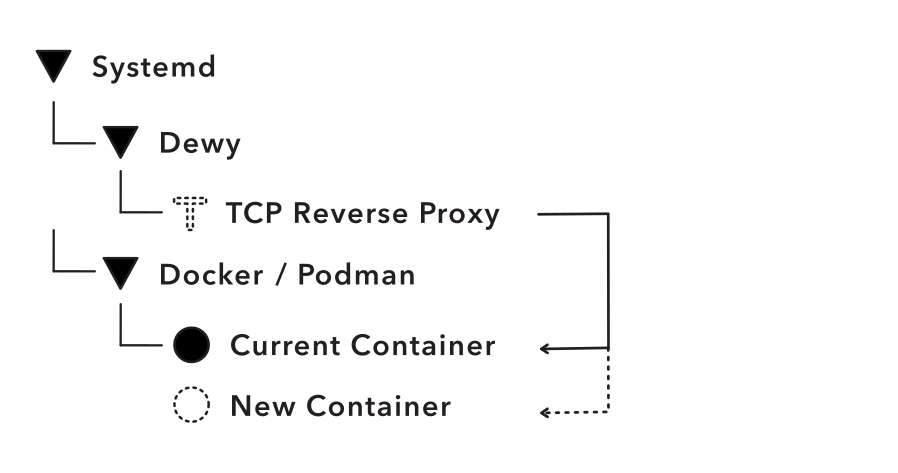
In Proxy Mode, Dewy manages containerized applications using Docker or Podman. It runs a built-in TCP reverse proxy that routes traffic to container backends, enabling zero-downtime rolling updates.
Components
- TCP Reverse Proxy: Listens on configured ports and load-balances traffic across container backends using round-robin
- Container Runtime: Manages Docker or Podman containers (pull, run, stop, remove)
- Health Checker: Verifies container health before adding to proxy backends
- Admin API: Provides HTTP endpoints for monitoring and management (e.g.,
dewy container list)
Deployment Process
- Registry Check: Polls OCI registry (e.g., GitHub Container Registry, Docker Hub) to detect new image versions
- Image Pull: Downloads the new container image
- Rolling Update: For each replica:
- Start new container with random localhost port mapping
- Wait for container to pass health checks (if configured)
- Add new container to proxy backends
- Traffic Switch: New containers now receive traffic via the proxy
- Old Container Cleanup: For each old container:
- Remove from proxy backends
- Wait for drain time to allow in-flight requests to complete
- Stop and remove the old container
- Image Cleanup: Remove old images, keeping only the most recent versions
Zero-Downtime Updates
The rolling update strategy ensures zero-downtime deployments:
- New containers are fully healthy before receiving traffic
- Old containers continue serving requests until drained
- The TCP proxy handles the traffic switching seamlessly
- Rollback occurs automatically if new containers fail health checks
Port Mapping
Containers are started with localhost-only port bindings (127.0.0.1::containerPort), which assigns random ephemeral ports. This approach:
- Avoids port conflicts between multiple replicas
- Isolates container traffic to localhost (only accessible via proxy)
- Allows the proxy to manage all external access
Comparison
| Feature | Supervisor Mode | Proxy Mode |
|---|---|---|
| Target | Binary applications | Container images |
| Deployment unit | Archive (tar.gz, zip) | OCI image |
| Process management | Child process | Container runtime |
| Load balancing | External (or single process) | Built-in TCP proxy |
| Graceful restart | SIGHUP + server-starter | Rolling update |
| Replicas | Single process | Multiple containers |
| Health check | N/A | HTTP endpoint |
In this way, Dewy communicates with a central registry to achieve pull-based deployment for both binary applications and containerized workloads.